The September 2026 release introduces two major changes. First is Data to AI, a new product offering customers can select to connect their data directly to AI agents and assistants. The second major update is the complete redesign of the source, destination, authorizer, and flow setup experience for a clearer, more intuitive interface.
Beyond those, the release extends a wide range of existing connectors with new datasets, fields, and metrics, and changes how manually running a flow behaves so it refreshes data before writing. It also expands the interactive API documentation introduced earlier this year and resolves a broad batch of connector and platform issues.
Connectors
New Connectors
- Adobe Analytics
- AppLovin
- Cursor (destination)
- Generic MCP (destination)
- OpenAI Ads
- Sangoma Wholesale
- TruContact
- Zoho Inventory
New Datasets, Attributes, and Metrics
- Amazon DSP: Added a new Inventory dataset.
- Exact Online: Added new Document Attachments and HRM Cost Centers datasets.
- Facebook Ads: Added a new Account Reach by Publisher Platform dataset.
- Facebook Organic:
- Added the
Call To Actionfield (including the nestedcall_to_action.value.linkURL) to the Posts Metadata dataset. - Added
Page Name,Reach,Impressions,Engagement,Clicks,Views,Average Video Viewing Time,Total Video Viewing Time,Post ID, andPublication Typefields to the Posts Metadata dataset. - Added new Page Daily Media Views by Ad Status and Post Lifetime Media Views by Ad Status datasets, splitting organic views from paid views.
- Added the
- Google Ads:
- Added the Customer (Customer Client) report type to the reports without metrics category. It extracts all accessible customer client IDs across Google Ads accounts for data-governance purposes.
- Added the
Unique Usersmetric. - Added the
Search Term Match Sourcesegment to the Search Term View report type. - Added the Asset group asset report type, covering Performance Max and Demand Gen campaigns.
- Google Display & Video 360: Added an Advertisers dataset, extracting the complete list of accessible advertiser IDs across all partners. Unlike the existing dataset, it isn't limited to advertisers with performance metrics in a given period.
- Google My Business: Exposed
storeCode,city, andpostal codefields in the headless Locations action. - Gusto: Added current home address fields to the Employees dataset.
- HubSpot:
- The Deals object now supports retrieving historical values for the
amountfield, with one row per historical value, including the change timestamp. - Added new Updated Companies and Updated Deals datasets, for extracting only recently modified records.
- Added date-range filtering to the Tickets (v3) dataset.
- The Deals object now supports retrieving historical values for the
- Instagram Organic: Added the
viewsfield to the Post Lifetime Insights (Video) dataset. - LinkedIn Ads:
- Added a new Member Region V2 dataset.
- Added campaign and account ID fields to the Member Country V2 dataset.
- Added a new Ad Creatives dataset.
- LinkedIn Organic: Added an
Organization Namefield to the page_followers_count dataset. - Marketo: Added an
Activity Type Namefield to the Activities object. - Sprinklr: Added new Followers, Organic Post Insights, and Media Asset Custom Fields datasets.
- TikTok Ads: Added
province_idandprovince_namedimensions to Audience Reports. - Twilio: Added Incoming Phone Numbers and Messaging Services datasets.
Connector Updates
- Amazon Ads: Refactored the underlying data model, including a cleanup of available metrics and dimensions.
- File Connectors (CSV, FTP, SFTP, S3, GCS):
- Can now skip header and footer lines, and support a broken bar (
¦) delimiter and ragged rows (rows with a varying number of columns). - Support multi-file backfills, matching files via a date-plus-timestamp naming pattern or a date-range expression directly in the file path. The path and filename inputs have also been unified into one.
- Added an
includeFilePathoption, adding a custom_filecolumn with the originating filename, useful for tracing a row back to its source when multiple files feed the same dataset. - Added
includeRowNumberand "ignore missing file" options.
- Can now skip header and footer lines, and support a broken bar (
- Google Ads: Upgraded to the latest API version,
v25. - Google Drive: Improved extraction performance and stability, plus a new flow template for getting started quickly.
- Zoho CRM: Upgraded to the latest API version,
v8.
New Features
Manual Flow Run Behavior
Running a flow manually previously triggered only the write action, without first re-extracting fresh data from its sources. This was a confusing default, since users generally expect "running" a flow to refresh the data first. Running a flow manually now triggers a fresh extraction before the write step, with the choice made clear in the flow's run modal. A manual run now always reflects current data, instead of whatever was last extracted on schedule.
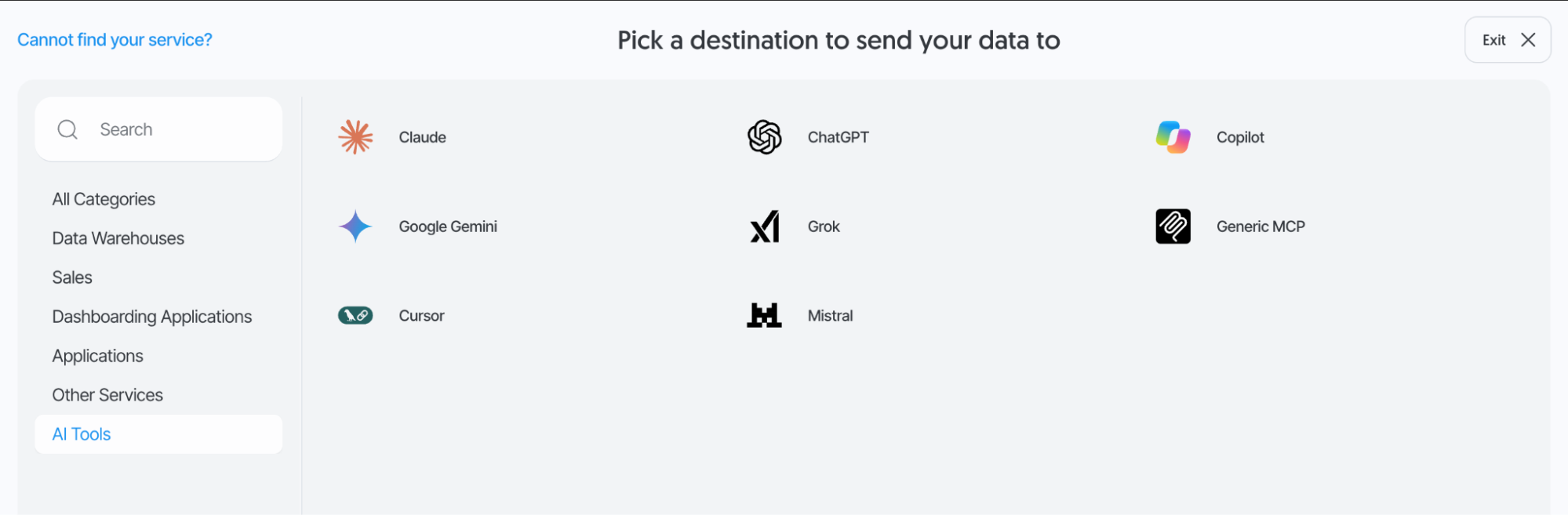
Data to AI
Data to AI is a new product that connects your data directly to the AI agents and assistants that act on it, replacing Data to Dashboards as Dataddo's approach to AI-facing data delivery.
Dashboards can tolerate being an hour out of date, but AI agents cannot. A stale dashboard is simply behind, while an AI agent acting on stale data might confirm an order that has already been cancelled.
Data to AI addresses this by continuously streaming committed changes from your operational systems to wherever your agents read from. Sensitive data is excluded or hashed at the source before it reaches an agent, rather than filtered out after the fact. Together, this means agents act on the current, clean state of your business, not a batch run from hours ago.
It supports two delivery shapes:
- A live mirror your agent queries directly.
- Ordered change events that trigger it.
A last_success_execution freshness field lets you confirm exactly when an agent's data was last updated.
For more information, see our available plans.
Platform Updates
Account & Authorizer Security Improvements
Account and authorizer security has been strengthened in several ways: provider refresh tokens are now revoked on logout, multi-factor authentication challenges are kept separate from already-authenticated sessions, and banned tokens are now blocked outright. SSO now also supports Okta via SAML, alongside existing providers.
Expanded API Documentation
The interactive API documentation introduced earlier this year now includes a complete reference generated from the OpenAPI spec, covering every available endpoint. It's joined by a full changelog of API changes, making it easier to look up exact request/response shapes and track what's changed between versions.
MCP Server Expansionit
The Dataddo MCP Server has a new dedicated /mcp-data endpoint, now supporting OAuth token authentication with explicit token roles. It also supports dynamic client registration, making it easier to connect new AI tools and assistants without manual setup, and includes metadata handling for Claude clients specifically.
UX/UI Enhancements
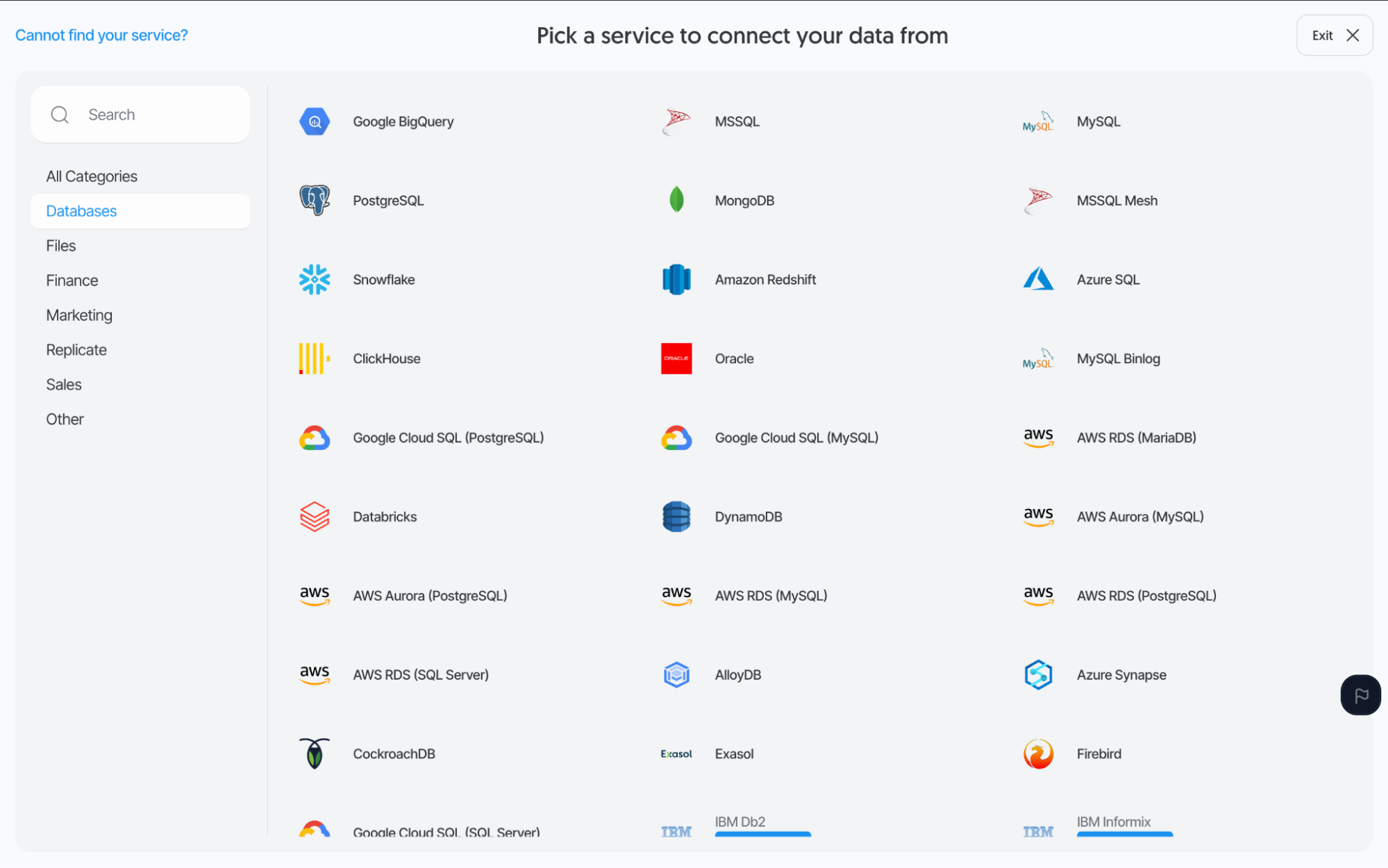
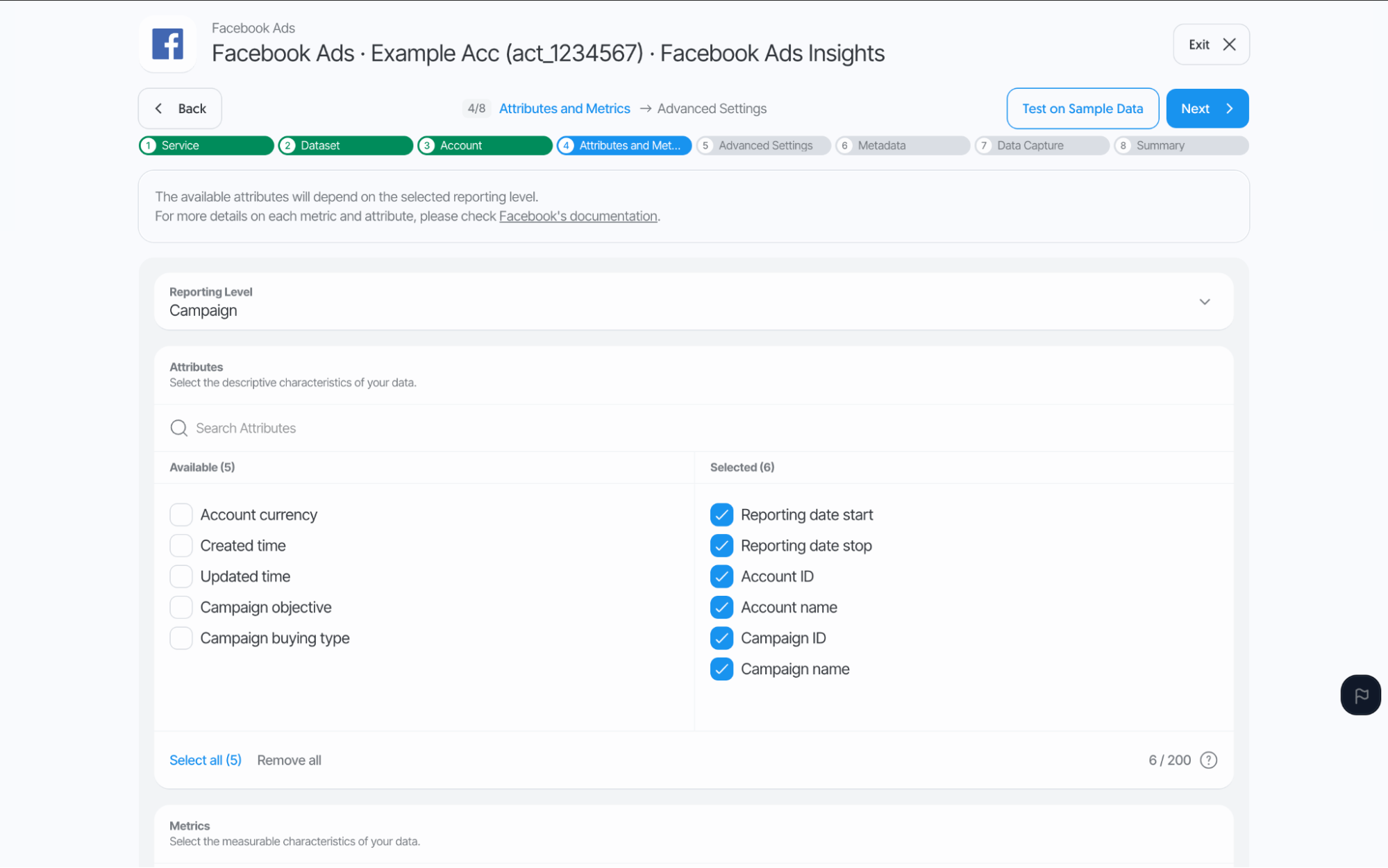
Redesigned Setup Experience
Source, destination, authorizer, and flow creation are getting a complete redesign, from the connector selector down to each individual step, for a clearer, more intuitive, and cleaner setup experience. This is part of Dataddo's ongoing platform UX overhaul to keep pace with today's fast-evolving data landscape.
For sources, this redesign includes the new Data Capture step described below, alongside new configuration wizards for each step. The new wizards are currently being rolled out to a subset of users, with a quick way to switch back to the previous flow.
Data Capture
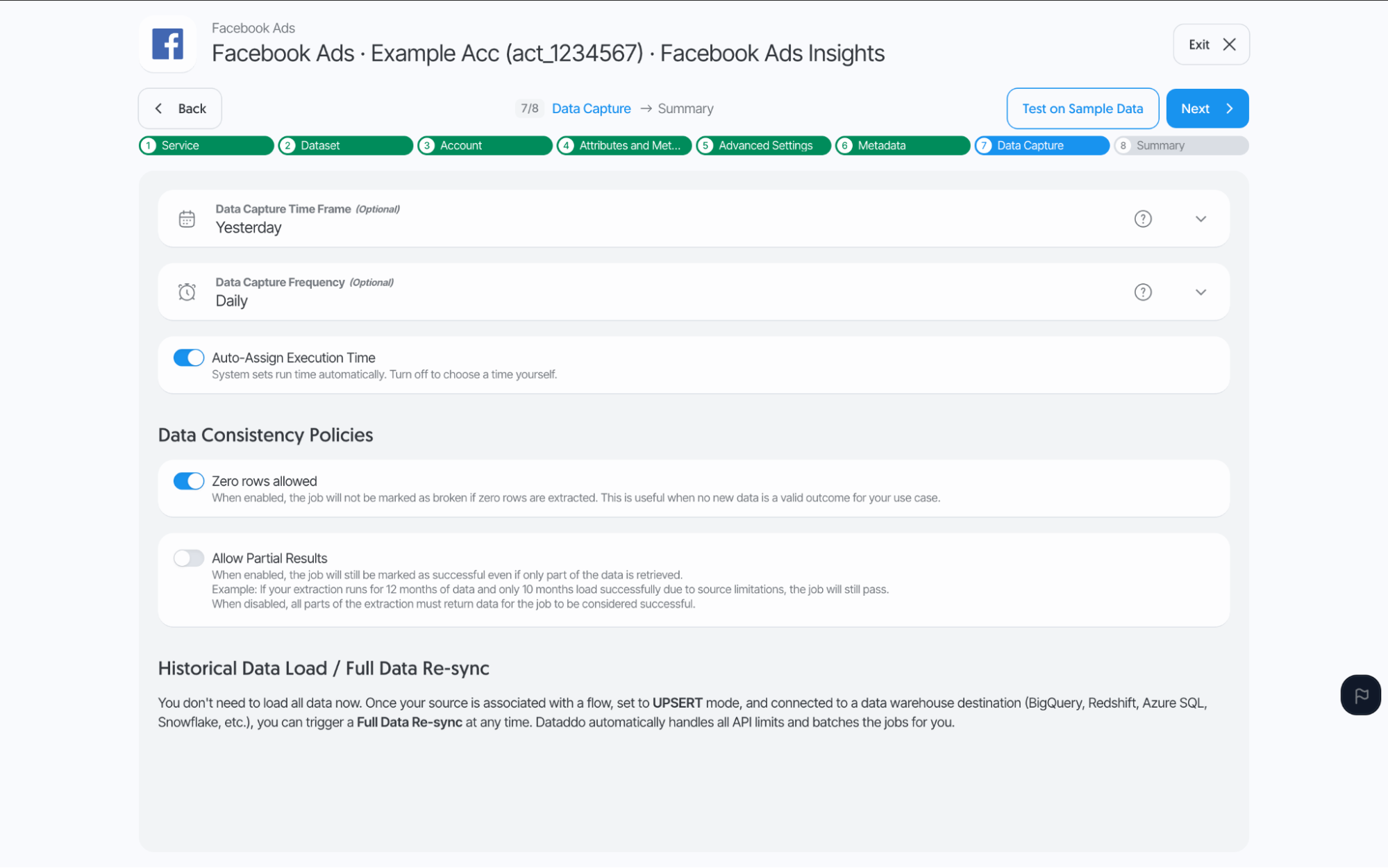
The snapshot setup step has been completely overhauled and unified across all connectors and settings under a new name, Data Capture. Instead of each connector handling snapshots its own way, there's now one consistent setup to learn, regardless of which connector it's on. That makes it faster to configure and easier to predict how a snapshot will behave.
Data Profile Implementation
A new Data Profile capability dynamically analyzes the data flowing through a source to improve data type detection automatically. This takes the guesswork out of pipeline setup: fields are typed correctly from the start, cutting down on the manual schema fixes and cleanup that used to be needed after the fact.
Bug Fixes
Connector Fixes
Amazon Ads DSP:
- Fixed global advertiser accounts not being discovered:
getAdvertisers()now returns DSP advertiser IDs plus other profile IDs. - Fixed a frontend validation bug that left the Next or Test buttons disabled after changing the Report Type selection during source creation.
AWS Aurora (PostgreSQL):
- Fixed source creation failing with a
Platform App\Document\Request\AwsAuroraPgsql not founderror.
Criteo:
- Fixed the Statistics Report dataset returning 0 rows for date ranges longer than 30 days. This was caused by the connector using an outdated Criteo API version. Upgrading it raised the supported range to 90 days.
Facebook Ads:
- Fixed asset-level breakdown ID columns (
image_asset_id,body_asset_id,description_asset_id,video_asset_id,title_asset_id,link_url_asset_id,call_to_action_asset_id) not being available for hash-based deduplication. This caused intermittent upsert failures in destinations like BigQuery when an ad had multiple same-day assets. - Fixed
title_asset_idreturning blank.
Facebook Organic:
- Fixed large-volume post source extractions failing with a
500 Internal Server Error. This was caused by connected pages lacking required permissions. Extraction now requires at least one valid permission before running. - Fixed a pagination issue in the Posts Metadata dataset.
Google Ads:
- Fixed the Ad Group report type being capped at 10,000 rows while Campaign report types were not.
Google Display & Video 360:
- Fixed automated extractions using a
0m0date range repeatedly loading stale or cached data instead of refreshing for the current month.
HubSpot:
- Fixed a pagination issue limiting the Contacts (v3) dataset to 200 rows.
LinkedIn Ads:
- Fixed the Member Country V2 dataset missing country fields and geo (URN) resolution.
Marketo:
- Fixed Leads datetime fields failing schema casting. This was caused by inconsistent date formats returned by the Marketo API.
MSSQL:
- Fixed table creation failing when a table name matched a reserved SQL keyword (e.g.
User). Table names are now escaped automatically.
Reddit Ads:
- Fixed reports being capped at 50 records due to missing pagination.
SFTP:
- Fixed CSV extraction failing with an
invalid syntaxparsing error on fields containing a comma-formatted decimal number (e.g.0,00). Such values now fall back to string type instead of erroring. - Fixed the dynamic date token in filenames failing after a date-range path change.
Snowflake:
- Fixed data loads failing when a source column was named
from, a reserved SQL keyword. Such columns are now escaped automatically.
Square:
- Fixed the Item Sales dataset being capped by missing pagination.
- Fixed an empty Square response producing a record with a
NULLprimary key, which could cause destination write failures (e.g. in Databox flows).
TikTok Ads:
- Fixed Ads Audience fields missing from the Insights dataset schema, despite not having been sunset by TikTok. This includes re-adding the
engaged_view_15s(15s Focused View) metric.
YouTube Organic:
- Fixed the Videos Metadata dataset only extracting the first 50 videos instead of paginating through all available results.
Zendesk:
- Fixed source creation failing for the Tickets dataset due to Zendesk's offset-pagination limits, by extracting through the Tickets Incremental dataset instead.
General Fixes
Authorizers Grid:
- Fixed the authorizers grid missing the ability to filter by status.
Broken Flow Notifications:
- Fixed broken-flow notifications defaulting to off for newly added Owners, causing them to miss critical alerts when their flows break. Owners now have this notification enabled by default.
CDC Source Editing:
- Fixed being unable to modify change data capture (CDC) configuration values after source creation. These fields are now editable from the source edit screen.
Flow Scheduling Tab:
- Fixed the flow scheduling tab not saving changes (form values weren't being sent to the backend at all). The tab has been removed. Schedule information is now shown directly on the flow's main configuration step instead.
Parquet Extraction:
- Fixed large Parquet files failing with an
inserted document is too largeerror even when no transformation was applied.
Restart Flow Protection:
- Reduced how often the restart-flow protection blocked legitimate restart attempts, cutting down on a confusing error message for users whose flow actually needed restarting.